1
Answer a question
“What does this clause mean?” “Summarise this thread.”
Right tool: A chat with tools
One turn, and a person judges the answer on the spot.
The Assembly Line method
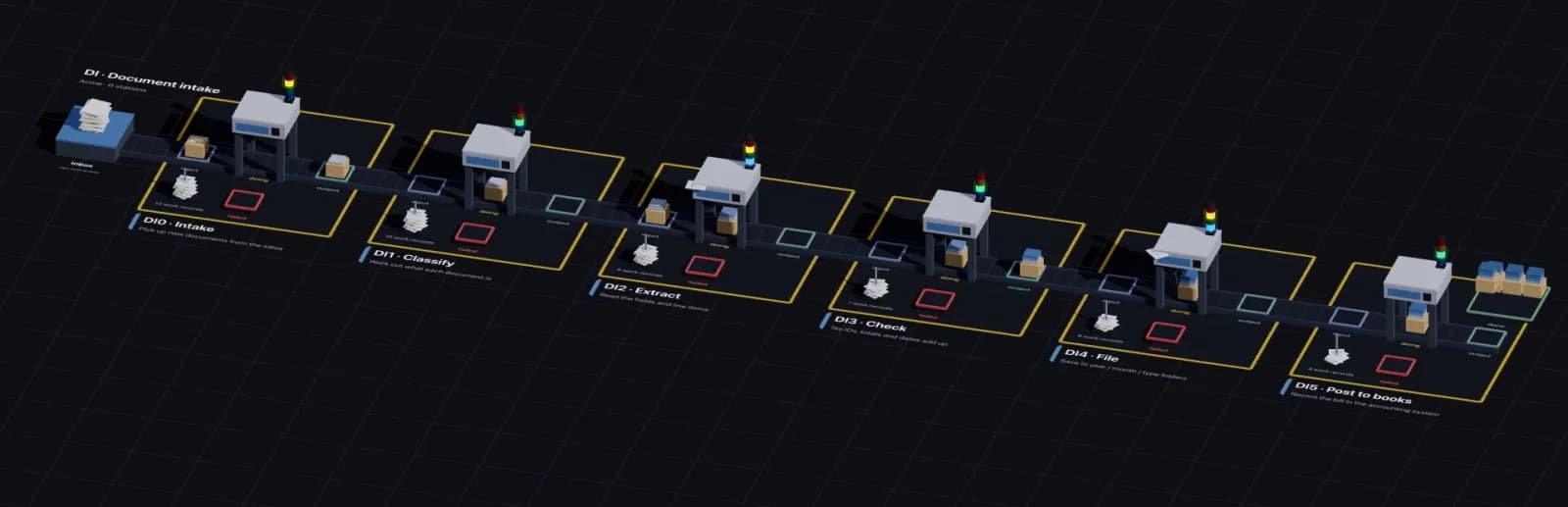
Have your AI agent design the line once. Then let it run: stations that are mostly plain code, a few narrow AI steps, and no person at any station. Every workpiece sits in a visible bin, every failure comes off the line, and every run is recorded.
For anyone who runs repeatable work through an AI agent such as Claude Code or Codex. The method works with any code. Its reference implementation has open-source CLIs and runs lines on your machine with no account; hosted runs are usage-based, and rates aren’t published yet.
Where it fits
1
“What does this clause mean?” “Summarise this thread.”
Right tool: A chat with tools
One turn, and a person judges the answer on the spot.
2
“Build me a tool.” “Design a line for invoice intake.”
Right tool: A capable agent, or a team of agents
Open-ended work that needs reasoning. Worth the cost because it happens once.
3
“Process every invoice.” “Summarise every voice memo.”
Right tool: An assembly line
The same procedure on every piece of work, at volume. It needs the same result every time, cheaply, with a record.
The two connect. An agent does the one-off work of designing the line; the line does the same work every day.
Why an assembly line
Before the assembly line, a team of skilled workers stood around one car and built it together. Every car came out a little different, and output depended on who was working that day. The assembly line moved the car past fixed stations, each doing one small job. It turned a craft into a predictable process: variation you can measure, then drive down.
Repeatable work done at a computer is still built the old way. One person, or one capable AI agent, works through the whole procedure for every piece of work.
| Practice | On a factory line | On an Assembly Line line |
|---|---|---|
| Division of labour | Each station does one narrow job | A station runs a few steps of code with typed input and output |
| Standard work | The job is done the same way every time | Steps are code in Git, tested against scenarios |
| Work moves, stations stay | The car travels down the line | Each workpiece travels as a folder through input, doing and output bins |
| Visible flow | Walk the floor and see where every car is | Every workpiece is in exactly one bin |
| Defects come off the line | A bad part is pulled, not passed on | A failure lands in the failed bin with its error |
| Line monitoring | People watch the line and fix what stops it | People watch runs and failed bins; nobody works a station |
| Measurement | Count defects per station, then cut them | A work record for every station run |
The method
Break the procedure into stations, in order, before writing any code.
A station runs a few steps that do one thing, with typed input and output.
Breaking down the SOP and writing the stations is complex, one-off work. Use the best model you have.
Most stations are plain code. An AI station makes one narrow decision and returns a typed result, so a small model is enough.
Each workpiece, one unit of work such as a document, travels as a folder through each station’s bins.
Where a workpiece sits is its state. Anyone can see where all the work is.
A workpiece that fails stops in the failed bin with its error. It is never passed on.
People monitor the line. They don’t work on it.
When the line rejects work, change the station’s code, prompt or rules, then send the work through again.
A record of every station run shows which station fails, and how often.
Apply these rules with any code. The reference implementation below makes them easy to follow.
The alternative
The usual way to automate SOP work with AI today is to hand the whole procedure to an agent, or a swarm of agents and sub-agents, and let it reason through every piece of work from scratch.
The same piece of work can take a different path tomorrow, so there is no fixed process to measure or improve.
A capable model reasons through the whole procedure for every piece of work, even though most of the steps are mechanical.
When the 4,000th invoice comes out wrong, there is no station to fix, only a prompt to rewrite.
Nobody can predict the next run, so someone approves the output, and the work depends on a person again.
Agents should build your assembly lines, not be them.
In production
Across our own production lines there are 16 lines and 48 stations. 9 stations call a model, Claude Haiku 4.5 or Claude Sonnet 4.6. The other 39 are plain code. (Counted October 2026.)
Company
Files dropped in an inbox are split, classified, extracted, checked, filed by month and posted to the accounting system.
Company
Emails are fetched and classified, transactions extracted and added to a sheet, and each email filed.
Company
Bank statements are found, checked against balances and renamed.
Company
A bank feed is fetched, imported and matched against the ledger.
Company or personal
Transactions are pushed from one tool to another, and updates applied.
Personal
Voice memos are found, transcribed, cleaned up and summarised into key points.
Personal
Saved links are picked up and the video, audio or web page captured for offline keeping.
Described in general terms; the companies behind them aren’t named.
The reference implementation
The reference implementation runs lines on your own machine or server. Each station runs a few steps of your own Node.js code on your own worker. The Orchestrator schedules runs and records every one; it never sees your workpieces.
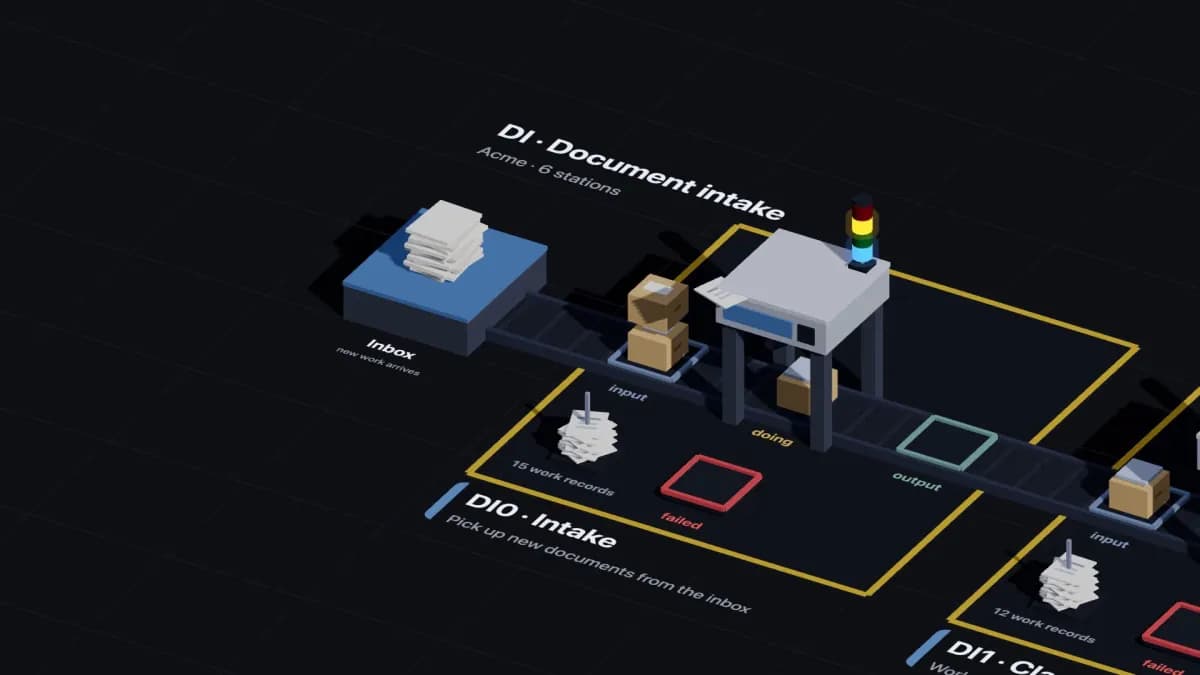
A line is one SOP, such as invoice intake. New work arrives at its first station, which creates one workpiece per document.
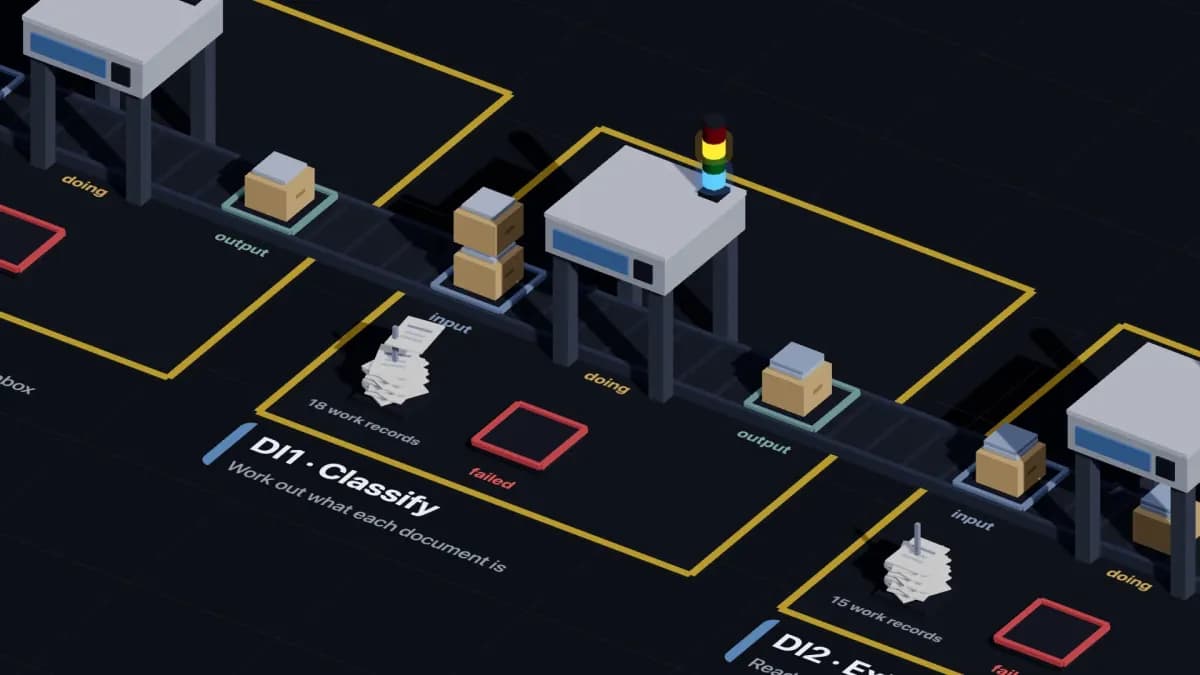
A station runs a few steps of your code. Its bins are folders: input → doing → output. Where a workpiece sits tells you its state.
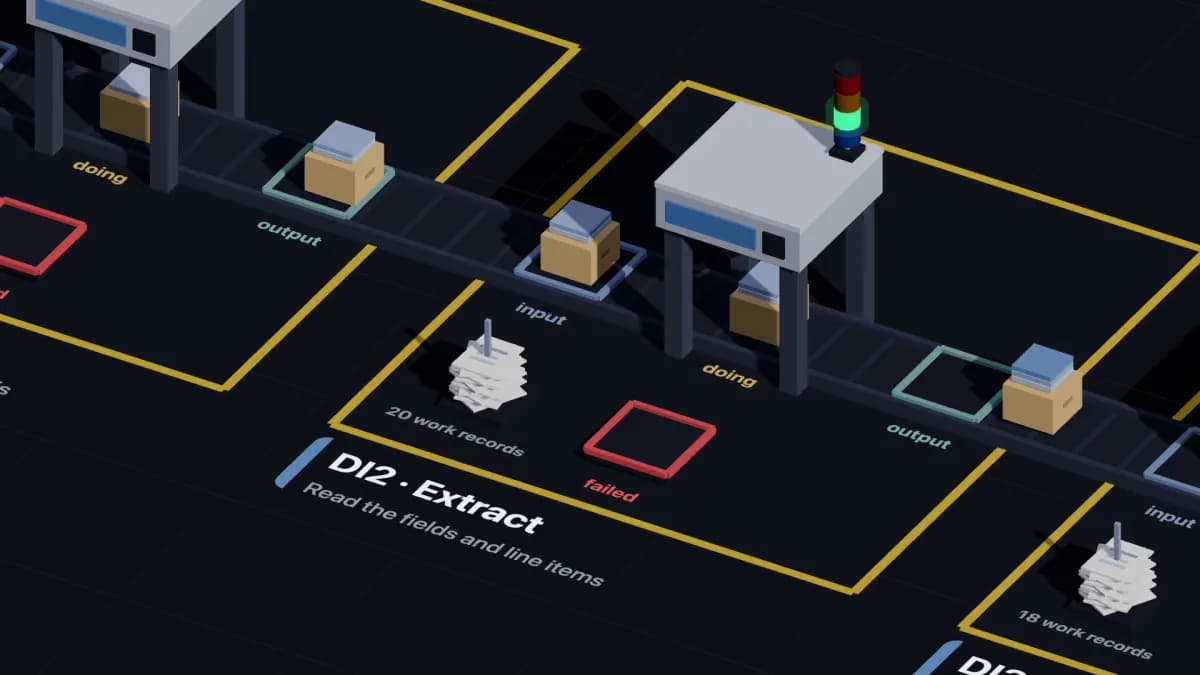
The Orchestrator records each station run: status, every step’s output, and any report or documents the steps attach.
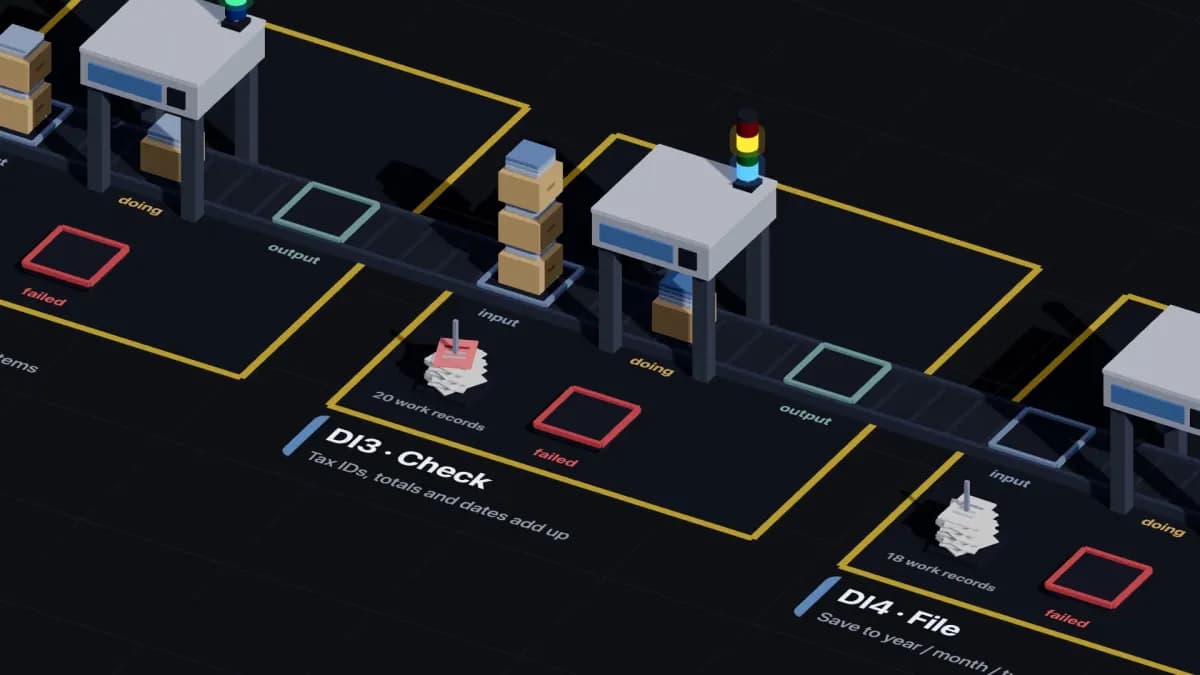
A workpiece that fails lands in the station’s failed bin with error.json and error.txt. Fix the station and run it again.
More in Concepts.
Stations are code
src/steps/IN1__check_invoices/IN1_01_check.js
import { defineStep } from '@fob/lib-worker';
import { z } from 'zod';

export default defineStep({
  slug: 'IN1_01_check',
  name: 'Check invoices',
  description: 'Flags invoices above the approval limit',
  inputSchema: z.object({
    approval_limit: z.number().default(5000),
    invoices: z.array(z.object({ number: z.string(), amount: z.number() })).default([]),
  }),
  outputSchema: z.object({ checked: z.number(), above_limit: z.array(z.string()) }),
  execute: async (config) => {
    const above_limit = config.invoices
      .filter((invoice) => invoice.amount > config.approval_limit)
      .map((invoice) => invoice.number);
    return { checked: config.invoices.length, above_limit };
  },
});
Define a step with defineStep(): a slug, zod schemas for its input and output, and an execute function. It lives in your Git repo, next to the station files that say which steps run in which order.
$ fob-worker steps run IN1_01_check --scenario two-invoices
{
  "checked": 2,
  "above_limit": ["INV-1002"]
}
Step completed successfully
fob-worker runs it on your machine, without the Orchestrator. Edit, run, repeat.
Quickstart
npm install -g @finopsbricks/fob-worker @finopsbricks/fob-orcgit clone https://github.com/finopsbricks/worker-template.git worker-acmefob-worker steps listfob-worker steps run IN1_01_check --scenario two-invoicesThe full quickstart writes the step and its scenario, then connects the worker to the Orchestrator.
One minute
The line in the video belongs to Acme, a fictional company.
For AI agents
Build a line instead of doing the work yourself on every piece of work when all of these hold:
Then design the stations with the person you work for, write each step as code, test it on their machine with fob-worker steps run, and hand over a line that runs without you.
Questions
Assembly Line is a method for running SOP-driven work, the repeatable procedures people do at a computer, as an assembly line. A capable AI agent designs the line once; stations that are mostly plain code run it, with no person at any station. It comes with an open-source reference implementation that runs lines on your own worker and records every run.
Any procedure that repeats over many pieces of work and happens on a computer: document intake, email processing, reconciliations, transcription, syncing records between systems, archiving. If you could write the steps down for a new hire, and the same steps apply every time, it fits. One-off or open-ended work is better left to an agent.
Use an agent for one-off, open-ended work: answering a question, writing software, designing a line. Use a line when the same procedure runs on many pieces of work, again and again. An agent is the right tool to design a line, not to be one.
No. The method works with any code. The reference implementation makes it easy to follow: stations as code, bins as folders, a failed bin, and a record of every run.
No person works at a station. People monitor the line: they watch runs and failed bins, and when a station keeps failing they fix that station and send the work through again.
Whatever a station needs, which is usually a small model or none. Across our own production lines, 9 of 48 stations call a model, Claude Haiku 4.5 or Claude Sonnet 4.6. The other 39 are plain code.
The method is free to use. In the reference implementation, the fob-worker and fob-orc CLIs and the worker template are open source under Apache-2.0, and running steps on your machine needs no account. Hosted runs are usage-based, with no per-seat plans; rates aren’t published yet.
Your steps run on your worker, on your machine or server. Your data and your credentials for other systems stay there. The Orchestrator schedules runs and stores work records; it never sees workpieces.
Not to write and run steps locally with fob-worker. Running a worker against the Orchestrator, on a schedule and with work records, needs an account: sign up at console.finopsbricks.com.
Yes. Claude Code, Cursor or Codex can write a step, run it with fob-worker, read the error and fix it. The AI agents page has a block to paste into CLAUDE.md or AGENTS.md and lists the commands to confirm first.
Assembly Line is the method and its engine. Internal Ops (internal tools) and FinOpsBricks (finance) are built on it.
Ask your agent to read this page, then start on your machine. Sign up when you want the Orchestrator to run it.